Schneider Electric
For Schneider Electric PLCs, SQL4automation provides the SQL4SE library, which is built on the SQL4CODESYSV3 library. SQL4SE uses the fbSQL4CODESYS function block and follows the same integration pattern as CODESYS V3. The library is installed via the SQL4SE_ProjectArchive.
Connecting Schneider Electric PLC to SQL Databases, MES, ERP
For Schneider Electric PLC controllers, SQL4automation provides a sample project and a library. The library can either be opened directly as a new project or integrated into an existing project. SQL4SE enables Schneider Electric PLCs to communicate directly with SQL databases via the SQL4automation Connector. The library is based on SQL4CODESYSV3 and uses the same fbSQL4CODESYS function block. It supports all standard SQL operations (SELECT, INSERT, UPDATE, DELETE) as well as stored procedures with return parameters (Connector >= V4.0).
Integration of the SQL4SE Library
The library S4A_SQL4CodesysV3.compiled-library is installed via the project archive SQL4SE_ProjectArchive - V1.0.0.0.projectarchive. The required standard libraries (Memory V3.5.7.0, Network V3.5.7.0, Standard V3.5.9.0, SysMem 3.5.5.0, SysTypes2 Interfaces 3.5.4.0) must also be present. Results are returned via the stResult structure and accessed using GetData() and GetColumnName() methods.
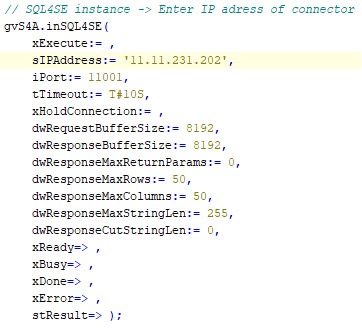
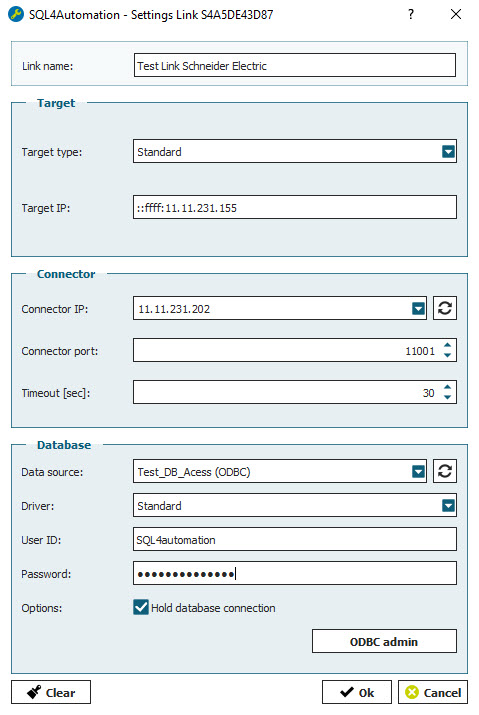
SQL4automation Link Settings
The SQL4automation Connector is operated with the target setting "Standard" for Schneider Electric controllers. The configuration is completed in just a few clicks.
FAQ’s
Frequently Asked Questions to Schneider Electric
Which Schneider Electric PLCs are compatible with SQL4automation?
SQL4SE is compatible with Schneider Electric PLCs that support the CODESYS V3 runtime and the required standard libraries (Memory, Network, Standard, SysMem, SysTypes2 Interfaces). The integration is based on the SQL4CODESYSV3 library and follows the same approach. Contact us with your specific Schneider Electric model for compatibility confirmation.
How is SQL4SE different from SQL4CODESYS?
SQL4SE is a wrapper built on the SQL4CODESYSV3 library, specifically packaged for Schneider Electric projects. It uses the same fbSQL4CODESYS function block and identical parameters and error codes. The main difference is the project archive packaging: SQL4SE is installed via SQL4SE_ProjectArchive rather than the generic CODESYS project archive.
How are query results accessed in a Schneider Electric program?
Results are accessed via the stResult structure and two methods: GetData(row, column) returns the data at a specific 0-based row and column index, and GetColumnName(column) returns the column name at a 0-based column index. inSQL4SE.stResult.diResultState contains the status code; inSQL4SE.stResult.dwResultRows and dwResultColumns report the result dimensions.
Does SQL4SE support stored procedures with return parameters?
Yes, when using SQL4automation Connector version V4.0 or higher. Set dwResponseMaxReturnParams to the maximum number of expected return parameters. For older Connector versions, this parameter must be set to 0. Return parameters are accessed separately from the main query result table.
Which SQL databases can a Schneider Electric PLC connect to via SQL4automation?
All ODBC-compatible databases are supported, including Microsoft SQL Server, MySQL, MariaDB, PostgreSQL, Oracle, and SQLite. The database is configured in the SQL4automation Connector. No changes to the Schneider Electric project are required when switching databases.
Which Schneider Electric controllers has SQL4automation been tested on?
SQL4automation for Schneider Electric is based on the SQL4CODESYSV3 library and has been tested on Schneider Electric PLCs that support the CODESYS V3 runtime with the required standard libraries (Memory V3.5.7.0, Network V3.5.7.0, Standard V3.5.9.0, SysMem 3.5.5.0, SysTypes2 Interfaces 3.5.4.0) like the M251 TM251MESE. The library is installed via SQL4SE_ProjectArchive. Contact us with your specific model for compatibility confirmation.
Technical Data
Switch to SQL4automation Now.
Connect industrial controllers directly with SQL databases. Field-proven since 2007 for maximum performance and security, completely without middleware.