ABB
For ABB robot controllers running RAPID, SQL4automation provides the SQL4Rapid library. For ABB AC500 PLCs, the SQL4AC500 library (CODESYS V2 based) or SQL4CODESYSV3 (for AC500 V3) are used. Both establish direct TCP/IP connections to the SQL4automation Connector, no OPC UA server or middleware required.
Connecting ABB Robots to SQL Databases, MES, ERP
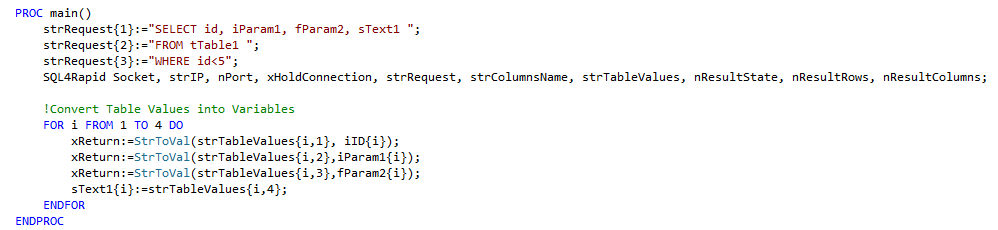
SQL4Rapid enables ABB robot controllers to read from and write to SQL databases directly via TCP/IP. The library is implemented as a RAPID module. The SQL request is assembled in the strRequest string array, and results are returned in the strTableValues 2D string array.
Integration of the SQL4Rapid Library
SQL4Rapid consists of the SQL4Rapid module (connection library) and main1 (sample program). Both are imported into the RAPID project via the robot programming environment. The IP address, port, and connection parameters are defined as local variables. A database request is triggered by calling the SQL4Rapid function with the strRequest array; results are returned in strTableValues.
SQL4automation Link Settings
The SQL4automation Connector is operated with the target setting "Standard" for ABB RAPID controllers.

FAQ’s
Frequently Asked Questions to ABB
Which ABB robot controller options are required for SQL4Rapid?
Two robot options must be licensed: 841-1 EtherNet/IP M/S for Ethernet socket communication and 616-1 PC Interface for the programming interface. Both must be ordered from ABB. Without these options, the TCP socket communication required by SQL4Rapid cannot be established.
How is the SQL request assembled in a RAPID program?
The SQL request string is stored in the strRequest string array. Each element can hold one line of the SQL query, allowing queries longer than 254 characters by splitting across multiple array elements. The SQL4Rapid function is then called with this array to execute the query.
What is the difference between SQL4AC500 and SQL4CODESYSV3 for ABB AC500?
SQL4AC500 is designed for ABB AC500 (classic) and is based on the CODESYS V2.3 protocol, opened with ABB Configurator or Automation Builder 2.5. SQL4CODESYSV3 is used for ABB AC500 V3, which supports the CODESYS V3 runtime. For AC500 V3, follow the CODESYS V3 integration documentation.
Does SQL4AC500 support stored procedure return parameters?
Yes, from SQL4AC500 version 4.0.0 onwards. Earlier versions do not support return parameters. Use the v4.0.1+ sample project opened with Automation Builder 2.5 to access this functionality.
Which SQL databases can ABB controllers connect to via SQL4automation?
All ODBC-compatible databases are supported, including Microsoft SQL Server, MySQL, MariaDB, PostgreSQL, Oracle, and SQLite. The database is configured in the SQL4automation Connector on the Windows PC. No changes to the ABB program or project are required when switching databases.
Which ABB controllers has SQL4automation been tested on?
For RAPID: tested on ABB IRC5 (options 841-1 + 616-1 required) and ABB OmniCore, as well as ABB Robotstudio. For AC500: tested on ABB AC500 PM383-ETH (v2.3.1 and v4.0.1+). For AC500 V3, the SQL4CODESYSV3 library is used on AC500 V3 hardware with CODESYS V3 runtime.
Technical Data
Switch to SQL4automation Now.
Connect industrial controllers directly with SQL databases. Field-proven since 2007 for maximum performance and security, completely without middleware.