Beckhoff TwinCAT

For Beckhoff TwinCAT, SQL4automation provides libraries and sample projects for both TwinCAT V2 (SQL4TwinCAT) and TwinCAT V3 (SQL4TwinCAT3), including a TLS/SSL-capable Version 5 library for TwinCAT V3. Both variants support unencrypted and encrypted communication.

Connecting Beckhoff TwinCAT PLC to SQL Databases, MES, ERP

For  Beckhoff TwinCAT V2 and V3, SQL4automation provides dedicated libraries.  SQL4TwinCAT (V2) uses the TcpIp.lib socket functions. SQL4TwinCAT3 (V3) uses  Tc2_TcpIp.lib, Tc2_Standard, and Tc2_System. Both can run on Soft-PLC or  hardware PLC. The TCP/IP server license (TF6310) is required for TwinCAT V3  and is subject to Beckhoff licensing; a 7-day trial license can be activated  repeatedly under System License.

Integration of the SQL4TwinCAT Library

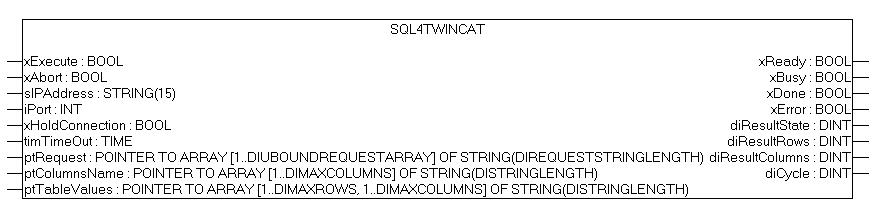
The  SQL4TwinCAT (V2) and SQL4TwinCAT3 (V3) function blocks receive the Connector  IP address, port, and SQL string as parameters. Return values are written to  the saTableValues array. Both libraries follow the same step-sequence  handshake pattern: xExecute triggers the query, xDone signals completion,  xError signals failure. The xHoldConnection parameter keeps the socket open  between requests for higher-throughput applications.
SQL4automation Link Settings

The  SQL4automation Connector is operated with the target setting  "Standard" for TwinCAT V2 and V3 controllers (or "UTF-16"  for the V3 UTF-16 variant). The configuration is completed in just a few  clicks. Detailed integration instructions are available in the download  section.

FAQ’s

Frequently Asked Questions to Beckhoff TwinCAT

Does SQL4automation support both TwinCAT V2 and TwinCAT V3?

Yes. Separate libraries are available for TwinCAT V2 (SQL4TwinCAT using TcpIp.lib) and TwinCAT V3 (SQL4TwinCAT3 using Tc2_TcpIp.lib). Both can run on Soft-PLC or hardware PLC and follow the same integration pattern. A Version 5 library for TwinCAT V3 additionally supports TLS/SSL encrypted communication.

Do I need a separate Beckhoff license to use SQL4automation with TwinCAT?

Yes. The TwinCAT TCP/IP Server is required for both V2 (licensed or 30-day demo) and V3. For TwinCAT V3, the TF6310 - TC3 TCP/IP license must be ordered from Beckhoff. For the Soft-PLC, the TC1200 - TC3 PLC license is also required. Both support repeated 7-day trial activations under System License.

What is the difference between the Standard and UTF-16 variants for TwinCAT V3?

Both variants are functionally identical. The Standard variant uses the default string encoding; the UTF-16 variant uses UTF-16 encoded strings in the SQL telegram. Select the variant that matches your database or middleware configuration. Both support unencrypted and TLS/SSL encrypted connections.

Can SQL4automation connect a Beckhoff TwinCAT PLC to any SQL database?

Yes. SQL4automation supports all ODBC-compatible databases including Microsoft SQL Server, MySQL, MariaDB, PostgreSQL, Oracle, and SQLite. The database is configured in the SQL4automation Connector on the Windows PC. No changes to the TwinCAT project are required when switching databases.

Does SQL4automation support TLS/SSL encryption for TwinCAT?

Yes, for TwinCAT V3 using the Version 5 library and Connector V5.1.0.0 or newer. Enable encryption by setting xTlsEnable = TRUE and providing the certificate common name, use case, and TLS version (1.3). Certificates are installed via the TwinCAT Security Screen. Always test without encryption first before enabling TLS.

Which Beckhoff TwinCAT systems has SQL4automation been tested on?

SQL4automation has been tested and verified on Beckhoff TwinCAT V2 running on both Soft-PLC ("TwinCAT PLC") and hardware PLC, and on Beckhoff TwinCAT V3 running on both Soft-PLC (TC1200 license) and hardware PLC. Both versions require a Beckhoff TCP/IP Server license (30-day demo available for V2; TF6310 license for V3 with repeatable 7-day trials).

Technical Data

REQUIREMENTS & VERSION INFO
TwinCAT V2 library TcpIp.lib must be connected in the library administration. TwinCAT TCP/IP Server (CE) must be installed (licensed or 30-day demo mode).
TwinCAT V3 libraries Tc2_TcpIp.lib (requires TF6310 license), Tc2_Standard, Tc2_System. All must be added under References. 7-day trial licenses can be repeatedly activated under System License.
TwinCAT V3 license TF6310 - TC3 TCP/IP license required from Beckhoff. TC1200 - TC3 PLC license required for Soft-PLC (both support 7-day trials).
TLS Connector version SQL4automation Connector V5.1.0.0 or newer required for TLS/SSL encryption (TwinCAT V3 Version 5 library only).
REQUIRED BLOCKS / LIBRARIES
  • SQL4TwinCAT.lib (V2) + TcpIp.lib in library administration
  • SQL4TwinCAT3 function block + GVL_SQL4TwinCAT3 global variable list (V3)
  • Tc2_TcpIp.lib, Tc2_Standard, Tc2_System (V3, added under References)
TLS / SSL ENCRYPTION
Applies to TwinCAT V3 with Version 5 library + Connector V5.1.0.0 or newer
Certificate paths C:\ProgramData\SQL4automation\certs\CA (RootCA)
C:\ProgramData\SQL4automation\certs\S4AConnector (server cert)
C:\ProgramData\SQL4automation\certs\S4AQueryTool (query tool cert)
TwinCAT TLS params xTlsEnable: TRUE
sTlsCertificateCommonName: <IP address of PLC>
sTlsUseCase: SQL4automation
sTlsVersion: 1.3
Certificate setup In TwinCAT: View > Security Screen > connect to controller. Add client cert under Devices > Own Certificates. Add server cert under Devices > Trusted Certificates.
Commissioning order Always test WITHOUT TLS first. Only enable encryption once unencrypted communication works. Check system time before enabling TLS.
FUNCTION BLOCK PARAMETERS
Parameter Type Description
xExecute BOOL Triggers the database request
xAbort BOOL Resets the connection
sIPAddress STRING(15) IP address of the SQL4automation Connector
iPort / uiPort UINT Port number of the SQL4automation Connector
xHoldConnection BOOL Keeps the socket connection open after a database request
tTimeOut TIME Communication timeout (V2 default: 30 s)
xReady BOOL Output: ready for a new database request
xBusy BOOL Output: database request in progress
xDone BOOL Output: database request completed successfully
xError BOOL Output: database request ended with an error
diResultState DINT Output: status / error code (0 = no error)
diResultRows DINT Output: number of rows returned
diResultColumns DINT Output: number of columns returned
BUFFER & GLOBAL CONSTANTS
Constant Default Description
diMaxRows (V2) / gc_diMaxRows (V3) 50 / 200 Max number of datasets from the table array
diMaxColumns (V2) / gc_diMaxColumns (V3) 15 Max number of columns from the table array
diStringLength (V2) / gc_diStringLength (V3) 40 String length in the table array
diUBoundRequestArray / gc_diUBoundRequestArray 20 Upper boundary of the request string array
diRequestStringLength / gc_diRequestStringLength 80 String length of request string array entries
diReadDataBuffer / gc_diReadDataBuffer 4096 / 8192 Max bytes of read buffer
diSendDataBuffer / gc_diSendDataBuffer 2048 / 8192 Max bytes of send buffer
gc_xSetOptionsAllowed (V3 only) TRUE Activates socket setting options. Deactivate on some controllers if needed.
ERROR CODES (diResultState)
Error Code Description
1 Unknown SQL command
2 Query returns more records than MaxRows. Adjust query or increase MaxRows.
3 Query returns more columns than MaxColumns. Adjust query or increase MaxColumns.
5 Query returns at least one value larger than MaxStringLength. Adjust query or increase MaxStringLength.
10 Internal Connector error
11 Internal Connector error; database cannot be opened
21 No IP address defined
22 No port number defined
23 Request string is empty
24 MaxRows not defined
25 MaxColumns not defined
26 Pointer to TableValues array not defined
27 Pointer to ColumnsName array not defined
28 Pointer to Request array not defined (V2) / send buffer too small (V3)
29 MaxStringLength not defined (V2) / send buffer too small: gc_diSendDataBuffer <= gc_diRequestStringLength (V3)
30 Send buffer too small: gc_diSendDataBuffer < 5 (V3 only)
41 No connection to SQL4automation Connector. Check firewall, IP address, and port.
51 Request string larger than send buffer
61 No data available for receipt (V2) / error during data reading (V3)
71 Connection to SQL4automation Connector cannot be closed
99 Timeout: no response from the Connector within the time window
>100 ODBC database connection error codes
40002 General error in the SQL query; request string is invalid

Switch to SQL4automation Now.

Connect industrial controllers directly with SQL databases. Field-proven since 2007 for maximum performance and security, completely without middleware.

Beckhoff TwinCAT
by Industry.