Bucher Automation JetSym
For Bucher Automation (formerly Jetter) PLCs, SQL4automation integration is available via the dedicated SQL4JetSym library. The library runs on all Bucher Automation controllers with an Ethernet interface and can be ordered directly at sales@bucherautomation.com.
Connecting Bucher Automation PLC to SQL Databases, MES, ERP
SQL4automation supports Bucher Automation (formerly Jetter) controllers via the SQL4JetSym library. SQL4JetSym runs on all Bucher Automation controllers equipped with an Ethernet interface. The SQL4JetSym library can be ordered directly at sales@bucherautomation.com. The SQL4automation Connector handles the ODBC database communication on the Windows side, while SQL4JetSym provides the PLC-side interface.
Integration of the SQL4JetSym Library
The SQL4JetSym library receives parameters such as the IP address and port of the Connector as well as the SQL string. The return values of the SQL query are written to the stResult structure.
The library is called from the STX program using the following command:

Default parameters of CfbSQL4JetSym:

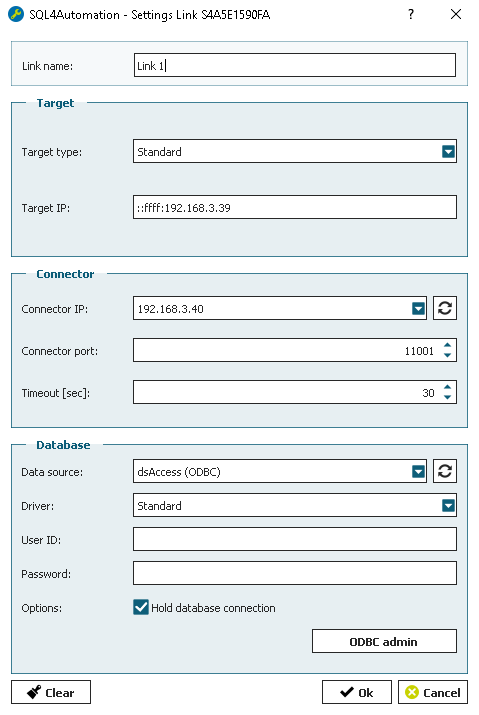
SQL4automation Link Settings
The SQL4automation Connector is operated with the target setting "Standard" for Bucher Automation controllers. For specific configuration details, refer to the integration documentation provided by Bucher Automation.
The SQL4JetSym library can be ordered here.
Tested Bucher Automation Controllers
The SQL4JetSym library has been tested on the following Bucher Automation PLC controllers:
• JC-340
• JC-350
• JC-365MC
• JC-440EXT
FAQ’s
Frequently Asked Questions to Bucher Automation
How do I get the SQL4automation library for Bucher Automation (Jetter) PLCs?
The SQL4JetSym for Bucher Automation (formerly Jetter) PLCs is provided directly by the manufacturer. Contact Bucher Automation at sales@bucherautomation.com to request the current library version and integration documentation.
Which Bucher Automation controllers are compatible with SQL4automation?
All Bucher Automation (Jetter) controllers that support the SQL4JetSym are compatible with SQL4automation. For a specific list of supported controller models and firmware versions, contact Bucher Automation directly at sales@bucherautomation.com.
What target setting should be used in the SQL4automation Connector for Bucher Automation?
The SQL4automation Connector is operated with the target setting "Standard" for Bucher Automation controllers. The specific link configuration details are included in the documentation provided by Bucher Automation.
Which SQL databases can a Bucher Automation PLC connect to via SQL4automation?
All ODBC-compatible databases are supported, including Microsoft SQL Server, MySQL, MariaDB, PostgreSQL, Oracle, and SQLite. The database is configured in the SQL4automation Connector on the Windows PC. The SQL4JetSym on the PLC side communicates with the Connector, which handles all ODBC database communication.
Where can I find integration documentation for SQL4automation with Bucher Automation PLCs?
Integration documentation for the SQL4JetSym is provided directly by Bucher Automation. Contact sales@bucherautomation.com for the current version of the library and the corresponding integration guide. General SQL4automation Connector configuration documentation is available in the download section on sql4automation.com.
Which Bucher Automation controllers has SQL4automation been tested on?
JC-340, JC-350, JC-365MC, JC-440EXT
Technical Data
Switch to SQL4automation Now.
Connect industrial controllers directly with SQL databases. Field-proven since 2007 for maximum performance and security, completely without middleware.