OMRON
For Omron NX/NJ PLCs programmed in Sysmac Studio, SQL4automation provides the SQL4Omron library (Sql4OmronLib.slr). The library requires CPU version 1.18 or newer and uses standard Omron socket functions (SktTCPConnect, SktClose, SktGetTCPStatus, SktClearBuf). The library was developed and tested with an NX1P2.
Connecting Omron PLC to SQL Databases, MES, ERP
SQL4Omron enables Omron NX/NJ PLCs to connect directly to SQL databases via TCP socket communication. The library is referenced as Sql4OmronLib.slr in an existing Sysmac Studio project. Communication uses standard Omron TCP socket functions. Note: the sample project cannot be tested in simulation mode as simulation does not support communication functions.
Integration of the Sql4Omron Library
The Sql4OmronLib.slr library is referenced in the Sysmac Studio project. The fbSql4Omron function block is instantiated and called cyclically in a separate task. SQL commands are assembled as STRING variables. INTEGER and REAL variables are converted to STRING using Omron conversion functions (INT_TO_STRING, DINT_TO_STRING, RealToFormatString) before inclusion in the SQL command.
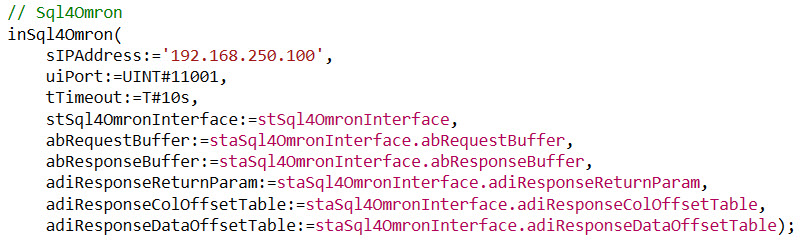
The Sql4Omron library receives parameters such as the IP address and port of the Connector as well as the SQL string. The return values of the SQL query are written to the stResult structure.
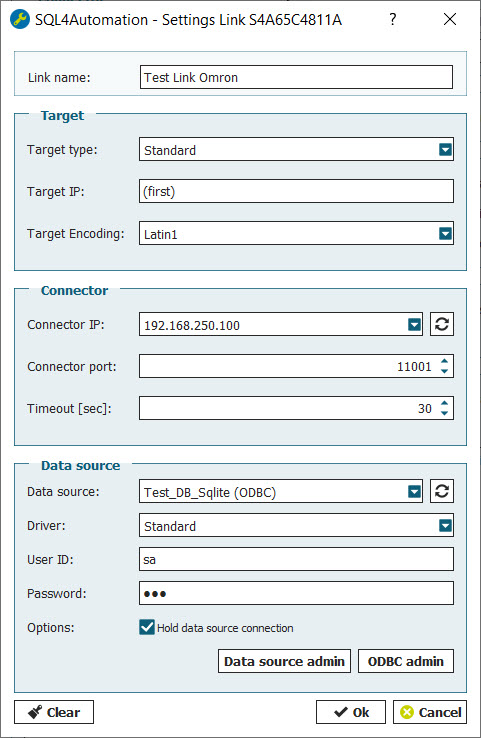
SQL4automation Link Settings
The SQL4automation Connector is operated with the target setting "Standard" for Omron Sysmac Studio controllers. The configuration is completed in just a few clicks.
FAQs
Frequently Asked Questions to Omron
Which Omron Sysmac Studio controllers are compatible with SQL4automation?
SQL4Omron requires Omron NX/NJ series controllers with CPU version 1.18 or newer. The library was developed and tested on an NX1P2 (9024DT1 v1.60). The sample project can be easily adapted to other Omron NX/NJ controller types by changing the controller in Sysmac Studio. Simulation mode is not supported; a physical controller is required for testing.
Can the SQL4Omron sample project be tested in Sysmac Studio simulation mode?
No. The sample project cannot be tested in simulation mode because Sysmac Studio simulation does not support communication functions (SktTCPConnect, SktClose, etc.). A physical Omron NX/NJ controller connected to the network is required to test the SQL4Omron integration.
How is an SQL command assembled in the Omron Sysmac Studio program?
SQL commands are assembled as STRING variables in the Sysmac Studio program. A step chain is programmed in the respective subroutine where the SQL command is built and passed to fbSql4Omron as a STRING. To include INTEGER or REAL values in the SQL command, use Omron conversion functions: INT_TO_STRING, DINT_TO_STRING, or RealToFormatString.
How are query results accessed after a successful SQL query in Sysmac Studio?
Results are available via the stResult output structure and the stSql4OmronInterface interface struct. diResultRows and diResultColumns report the dimensions. diResultState contains the status code (0 = success). The diResultReturnParams output gives the number of return parameters received from stored procedures.
Which SQL databases can an Omron NX/NJ PLC connect to via SQL4automation?
All ODBC-compatible databases are supported, including Microsoft SQL Server, MySQL, MariaDB, PostgreSQL, Oracle, and SQLite. For stored procedure testing, an MS SQL Server is required. The database is configured in the SQL4automation Connector on the Windows PC.
Which Omron controllers has SQL4automation been tested on?
SQL4automation has been developed and tested specifically on the Omron NX1P2 (9024DT1, firmware v1.60) running in Sysmac Studio. The library requires CPU version 1.18 or newer. The sample project (Sql4OmronExampleProject.smc2) can be adapted to other Omron NX/NJ series controllers by changing the controller type in Sysmac Studio. Note: simulation mode is not supported; a physical controller is required.
Technical Data
Switch to SQL4automation Now.
Connect industrial controllers directly with SQL databases. Field-proven since 2007 for maximum performance and security, completely without middleware.