Phoenix Contact PLCnext

For Phoenix Contact PLCnext controllers, SQL4automation provides two example projects and a dedicated library (SQL4PLCnext). One example project communicates via the standard protocol, the other via the UTF-16 protocol. Both supporting unencrypted and TLS/SSL-encrypted connections. The library can be directly integrated into PLCnext Engineer as a standard function-block library and works on all PLCnext controllers equipped with an Ethernet interface.

Connecting Phoenix Contact PLCnext to SQL Databases, MES, ERP

For Phoenix Contact PLCnext controllers, SQL4automation provides two example projects and the SQL4PLCnext library. One example communicates via the standard protocol, the other via UTF-16. Both support unencrypted and TLS/SSL-encrypted connections. The library is based on IEC 61131-3 and integrates directly into PLCnext Engineer, enabling direct PLC-to-database communication without any middleware or additional hardware.

Integration of the SQL4PLCnext Library

The central function block fbSQL4PLCnext manages the connection to the SQL4automation Connector. It is called cyclically in a dedicated low-priority task (recommended: 10 ms interval, priority 10) and receives parameters including the Connector IP address, port, timeout, and TLS settings. Query results are returned via the shared utSQL4PLCnextInterface data structure, accessible from all tasks in the PLCnext program.

SQL4automation Link Settings

The SQL4automation Connector is operated with the target setting "Standard" for PLCnext controllers (or "UTF-16" for the UTF-16 variant). The project-specific adjustments are made in just a few clicks. For encrypted connections, TLS is enabled directly in the fbSQL4PLCnext block (requires Connector V5.1.0.0 or newer).
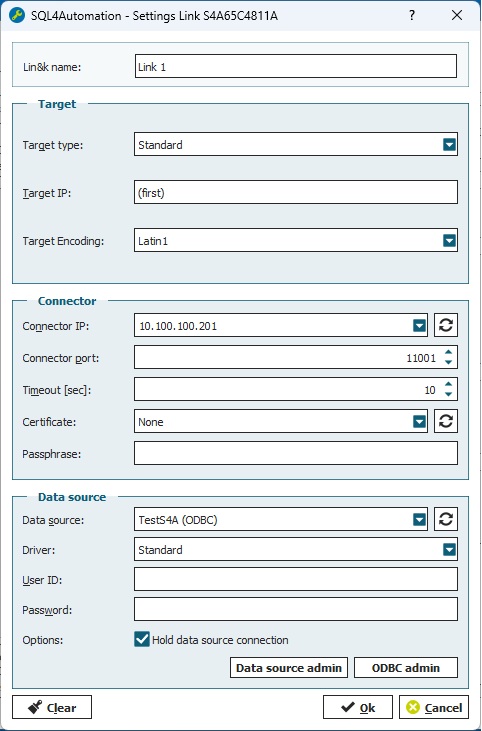
Using target settings "UTF-16"

For encrypted connections, select the "Standard"target and enable TLS in the fbSQL4PLCnext block by setting xUseTLS = TRUE andproviding the corresponding identity and trust store names. A Connector version of V5.1.0.0 or newer is required for encrypted communication.

FAQ's

Freuqently Asked Questions to Phoenix Contact PLCnext

Can a Phoenix Contact PLCnext controller connect directly to a SQL database?

Yes. SQL4automation provides the SQL4PLCnext library, which establishes a direct TCP/IP connection from the PLCnext controller to the SQL4automation Connector running on a Windows PC. The Connector handles the ODBC communication with the database. No OPC UA server, no middleware, and no additional hardware are required.

Which PLCnext Engineer version is required for SQL4automation?

PLCnext Engineer 2026.0 or newer is required. The Phoenix Contact manufacturer libraries PLCnextBase_1_7_2.pcwlx (and its sub-libraries PLCnextBase.pcwlx and PLCnextBaseServices.pcwlx) must also be installed before adding SQL4PLCnext to your project. The recommended install path is C:\Users\<user>\Documents\PLCnext Engineer\Libraries.

Does SQL4automation support encrypted communication with PLCnext?

Yes. TLS/SSL encrypted communication is supported from Connector version V5.1.0.0 onwards. Enable it by setting xUseTLS = TRUE in the fbSQL4PLCnext block and providing the Identity Store and Trust Store names configured via the PLCnext web interface. Certificates are generated with OpenSSL and must be in PEM format for PLCnext. Always test without encryption first.

What is the difference between the Standard and UTF-16 example projects?

Both example projects offer identical functionality and use the same fbSQL4PLCnext function block. The only difference is the string encoding in the SQL telegram: the Standard project uses the default encoding, while the UTF-16 project uses UTF-16 encoded strings. Both support encrypted and unencrypted connections. Choose the variant that matches your database or middleware configuration.

In which PLCnext task should the fbSQL4PLCnext block be called?

Place fbSQL4PLCnext in a dedicated low-priority task: tskUncritical, Interval = 10 ms, Priority = 10. This ensures database communication does not interfere with time-critical control tasks. For high-frequency applications, the optional fbSQL4PLCnextConnectionObserver block maintains a persistent connection and sends keep-alive queries to prevent timeout errors during idle periods.

Technical Data

REQUIREMENTS & VERSION INFO
PLCnext Engineer version 2026.0 or newer
Library file S4A_SQL4PLCnext.pcwlx
Referenced manufacturer libs PLCnextBase_1_7_2.pcwlx
PLCnextBase_1_7_2\PLCnextBase.pcwlx
PLCnextBase_1_7_2\PLCnextBaseServices.pcwlx
Library install path C:\Users\<user>\Documents\PLCnext Engineer\Libraries
Example projects S4A_SQL4PLCnext_Example.pcwex (Standard protocol)
S4A_SQL4PLCnext_UTF16_Example.pcwex (UTF-16 protocol)
TLS Connector version SQL4automation Connector V5.1.0.0 or newer required for TLS/SSL encryption
REQUIRED BLOCKS / LIBRARIES
  • S4A_SQL4PLCnext.pcwlx (SQL4PLCnext library)
  • PLCnextBase_1_7_2.pcwlx (Phoenix Contact manufacturer library)
  • Data type definitions in: Local > Data Types > S4A_SQL4PLCnext
  • Library reference: S4A_SQL4PLCnext
  • fbSQL4PLCnext (main communication block, called cyclically)
  • stSQL4PLCnextInterface (instantiated as global/external memory under IEC 61131-3)
  • fbSQL4PLCnextConnectionObserver (optional, for persistent connections)
CONNECTOR-SIDE SETTINGS
Target setting Standard (or UTF-16 for the UTF-16 example project)
Task setup Place fbSQL4PLCnext in a low-priority task: tskUncritical, Interval = 10 ms, Priority = 10
Default PLC IP 192.168.1.10 (new or reset controller); username: admin; password: printed on device label
TLS / SSL ENCRYPTION
Connector version TLS/SSL requires SQL4automation Connector V5.1.0.0 or newer
Certificate paths C:\ProgramData\SQL4automation\certs\CA (RootCA)
C:\ProgramData\SQL4automation\certs\S4AConnector (server cert)
C:\ProgramData\SQL4automation\certs\S4AQueryTool (query tool cert)
PLCnext certificate format PLCnext controllers require PEM format. Use XCA tool (V2.9.0+) to convert and export certificates.
PLCnext certificate setup Log in to controller via web browser. Create a new Trust Store and import root certificate. Create a new Identity Store and import client certificate and key.
Block parameters for TLS xUseTLS: TRUE
sTlsIdentityStoreName: <name of Identity Store configured in browser>
sTlsTrustStoreName: <name of Trust Store configured in browser>
Commissioning order Always test connection WITHOUT TLS first. Only enable encryption once unencrypted communication is confirmed working. Check system time before enabling TLS.
FUNCTION BLOCK PARAMETERS
Parameter Type Description
sIP STRING IP address of the SQL4automation Connector
iPort INT Port number of the SQL4automation Connector
tTimeout TIME Communication timeout (default: 10 s)
tFbExecTimeLimit TIME Maximum usable processing time per PLC cycle
xUseTLS BOOL Enable TLS/SSL encrypted communication
sTlsIdentityStoreName STRING Identity Store name for encrypted communication
sTlsTrustStoreName STRING Trust Store name for encrypted communication
stSql4PLCnextInterface utSql4PLCnextInterface Request/response data structure (connection to the Connector)
BUFFER & GLOBAL CONSTANTS
Constant Default Description
SQL4PLCNEXT_USE_MRP_PARAMETER TRUE Enable return parameters from Stored Procedures (requires Connector >= V4.0.0.0; set FALSE for older Connectors)
SQL4PLCNEXT_REQUEST_BUFFER_SIZE 8192 Size of the send buffer (bytes)
SQL4PLCNEXT_RESPONSE_BUFFER_SIZE 8192 Size of the receive buffer (bytes)
SQL4PLCNEXT_RESPONSE_RETURNPARAM_SIZE 5 Maximum number of return parameters in the response table
SQL4PLCNEXT_RESPONSE_ROW_SIZE 20 Maximum number of rows in the response table
SQL4PLCNEXT_RESPONSE_COL_SIZE 10 Maximum number of columns in the response table
SQL4PLCNEXT_RESPONSE_MAX_STRING_SIZE 255 Maximum length of response strings (characters)
SQL4PLCNEXT_RCVARRAY_SIZE 200 Size of the receive array (bytes received per PLC cycle)
ERROR CODES (diResultState)
Error Code Description
1 Unknown SQL command
2 Query returns more records than MaxRows. Adjust query or increase MaxRows.
3 Query returns more columns than MaxColumns. Adjust query or increase MaxColumns.
4 Query returns more data than the defined buffer size. Adjust query or increase buffer size in the Connector and controller.
5 Query returns at least one value larger than MaxStringLength. Adjust query or increase MaxStringLength.
10 Internal Connector error
11 Internal Connector error; database cannot be opened
21 No IP address defined
22 No port number defined
23 Request string is empty
29 MaxStringLength size is invalid
41 No connection to SQL4automation Connector. Check firewall, IP address, and port.
51 Error sending the request. Check firewall, IP address, and port.
91 Timeout: no response from the Connector within the time window
95 Error receiving data
>100 ODBC database connection error codes
40002 General error in the SQL query; request string is invalid

Switch to SQL4automation Now.

Connect industrial controllers directly with SQL databases. Field-proven since 2007 for maximum performance and security, completely without middleware.

Phoenix Contact PLCnext
by Industry.
No items found.