Siemens S7
For Siemens S7, SQL4automation provides four sample projects: one for Siemens S7-1200 and Siemens S7-1500 in TIA Portal, one for S7-300 / S7-400 PN/DP controllers, and one in combination with the communication processor CP-343 / CP-443 in Simatic Studio.
Connecting Siemens S7 PLC to SQL Databases, ERP, MES
For Siemens S7, SQL4automation provides four sample projects. For Siemens S7-1200 and Siemens S7-1500 in TIA Portal, one for S7-300 / S7-400 PN/DP controllers, and one in combination with the communication processor CP-343 / CP-443 in Simatic Studio. No OPC UA server, no middleware, and no additional hardware are required. SQL4automation connects your Siemens PLC directly to any ODBC-compatible database.
Project-Specific Adjustments DB SQL4Siemens
Only a few project-specific adjustments need to be made in the SQL4Siemens data block: the IP address and port of the SQL4automation Connector, and the SQL string. The data block structure is identical across all supported S7 families, making it straightforward to migrate between controller generations.
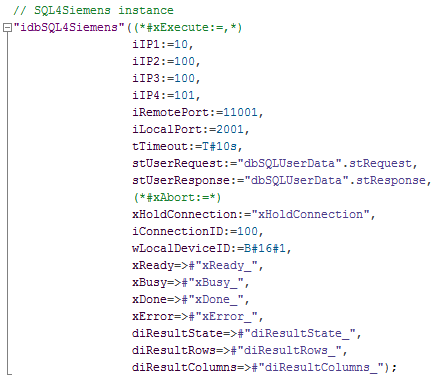
SQL4automation Link Settings
SQL4automation provides dedicated connection settings for Siemens S7. The project-specific adjustments are made in just a few clicks. In the download section, you will find detailed instructions on how to properly integrate the SQL4Siemens library and configure the SQL4automation Connector.
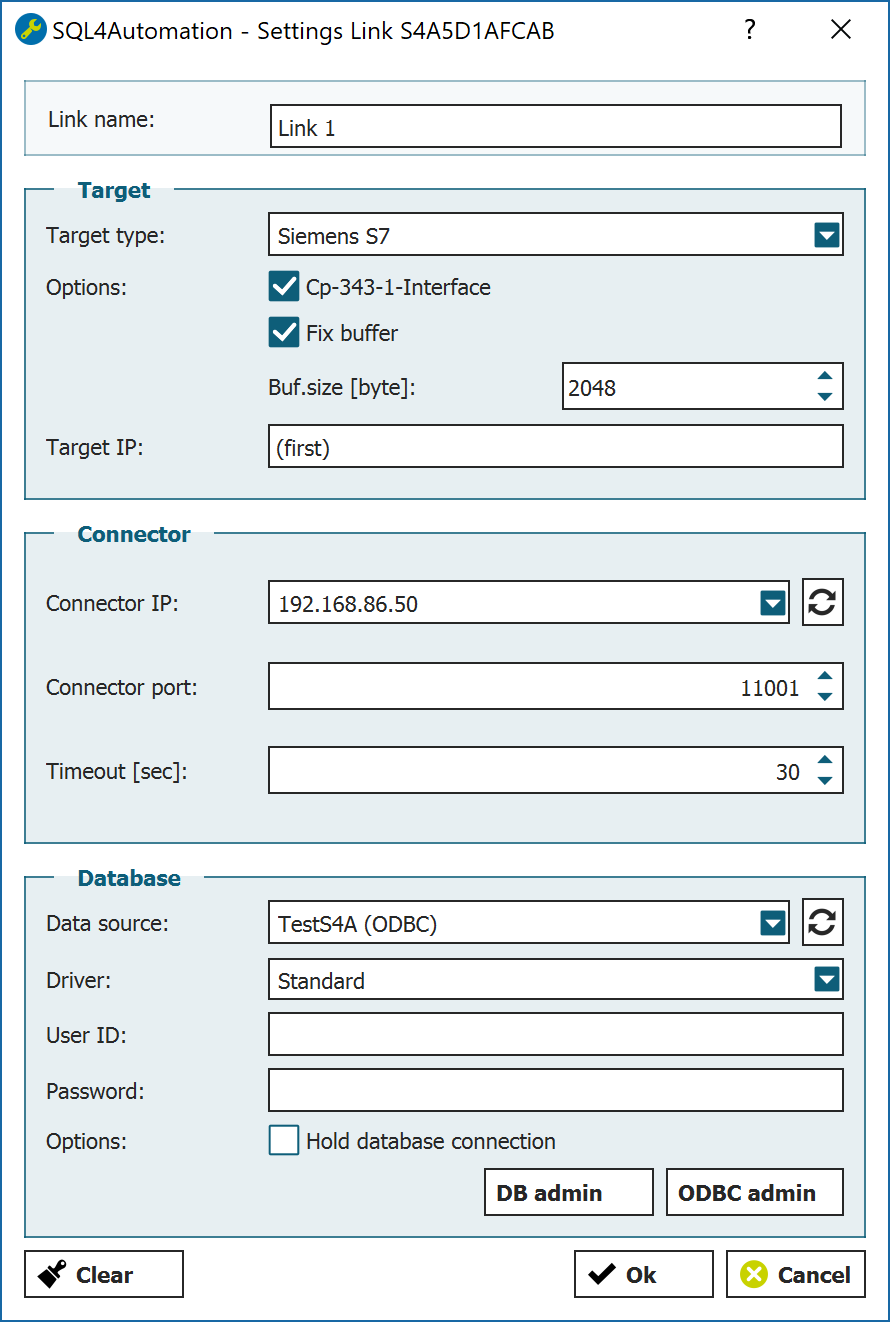
In the download section, you will find detailed instructions on how to properly integrate the SQL4Siemens library and configure the SQL4automation Connector.
FAQ's
Freuqently Asked Questions to Siemens S7
Can SQL4automation connect a Siemens S7 PLC directly to a SQL database without OPC UA?
Yes. SQL4automation establishes a direct TCP/IP connection between the Siemens S7 controller and the SQL4automation Connector running on a Windows PC. No OPC UA server, no additional middleware, and no extra hardware are needed. The Connector translates SQL queries from the PLC data block into native ODBC calls to your database.
What is the limitation of string length per query between PLC & SQL Database?
Unlimited. There is no limitation except for the buffer size which you can set to your liking.
Which Siemens TIA Portal versions are supported?
SQL4automation provides ready-to-use sample projects for TIA Portal V13 and newer, covering both S7-1200 and S7-1500 controller families. Legacy projects for S7-300 / S7-400 PN/DP controllers are available for Simatic Manager / Step 7 as well. Check the download section for the latest compatible project files.
Which SQL databases are compatible with SQL4automation for Siemens S7?
SQL4automation supports all ODBC-compatible databases, including Microsoft SQL Server, MySQL, MariaDB, PostgreSQL, Oracle, SQLite, and many more. The database selection is made in the SQL4automation Connector. No changes to the Siemens PLC project are required when switching databases.
Does SQL4automation support TLS encrypted communication for Siemens S7?
Yes, from Connector version V5.1.0.0 onwards. TLS requires firmware V2.5 or newer on S7-1500 and firmware V4.2 or newer on S7-1200. Note: TLS connection setup on S7-1200 can take up to 14 seconds, so it is recommended to use the ConnectionObserver pattern with xHoldConnection = TRUE to keep the connection open and avoid repeated setup delays.
For which Siemens PLC controllers has the SQL4automation library been tested?
SIMATIC S7-1200 CPU, SIMATIC S7-1500 CPU, SIMATIC S7 CP 1243-1, SIMATIC S7 CP 1543-1, SIMATIC S7-300 CPU 315-2 PN/DP, SIMATIC S7-300 CPU 317-2 PN/DP, SIMATIC S7-300 CPU 319-3 PN/DP, SIMATIC CP 343-1, SIMATIC S7-400, SIMATIC CP 443-1, SIMATIC WinAC RTX
Does SQL4automation work with Siemens S7-300 and S7-400 controllers?
Yes. SQL4automation includes a dedicated sample project for S7-300 and S7-400 PN/DP controllers, as well as a variant using the CP 343-1 and CP 443-1 communication processors configured in Simatic Studio. All three S7 generations (300/400, 1200, and 1500) use the same SQL4Siemens data block structure, so the integration approach is consistent across platforms.
Technical Data
Switch to SQL4automation Now.
Connect industrial controllers directly with SQL databases. Field-proven since 2007 for maximum performance and security, completely without middleware.