Sigmatek
For Sigmatek LASAL controllers, SQL4automation provides the SQL4LASAL library with support for both UTF-8 (Standard target) and UTF-16 communication. All Sigmatek controllers with open TCP/IP communication support are compatible. The library has been tested with the SoftSPS Lars and a C-IPC.
Connecting Sigmatek LASAL PLC to SQL Databases, ERP, MES
SQL4LASAL enables all Sigmatek controllers with open TCP/IP communication to connect directly to SQL databases via the SQL4automation Connector. The library provides two classes: SQL4LASALASCII for UTF-8 (Standard target) and SQL4LASALUCS2 for UTF-16 communication. Both classes support SELECT, INSERT, UPDATE, and DELETE operations as well as cyclic data writing.
Integration of the SQL4LASAL Library
The SQL4LASAL library is integrated as a class-based interface. The SendRequest method handles SQL requests; FormatString and FormatDateTime helper methods are available for converting data types into SQL-compatible strings. The library exposes standard status signals (xBusy, xDone, xError) and result data (diResultRows, diResultColumns, diResultState).
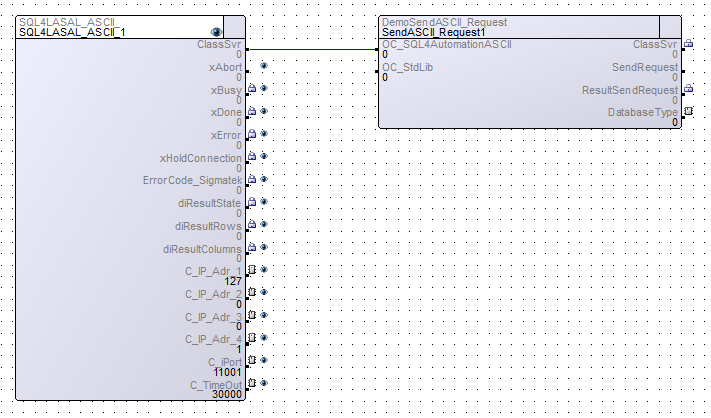
SQL4Automation Link Settings
The SQL4automation Connector is operated with the target setting "Standard" for UTF-8 communication (SQL4LASALASCII) and "UTF-16" for Unicode communication (SQL4LASALUCS2). Both target types can be configured simultaneously for different links. The configuration is completed in just a few clicks.

FAQ’s
Frequently Asked Questions to Sigmatek
Which Sigmatek controllers are compatible with SQL4automation?
All Sigmatek controllers that support open TCP/IP communication can be connected to SQL4automation. The library has been tested on the SoftSPS Lars and C-IPC hardware. Other Sigmatek hardware models with TCP/IP support should be compatible as well.
What is the difference between the SQL4LASALASCII and SQL4LASALUCS2 classes?
SQL4LASALASCII communicates via UTF-8 encoding and requires the Standard target setting in the SQL4automation Connector. SQL4LASALUCS2 communicates via UTF-16 encoding and requires the UTF-16 target setting. Both classes can be used simultaneously in the same project with different link configurations.
How can I perform cyclic data writes to a SQL database from Sigmatek?
The SQL4LASAL sample project includes a NET Cyclic example (SQL4LASAL_Cyclic) that demonstrates continuous data writing to the database. Setting diStart > 0 starts the cyclic INSERT execution. This example also illustrates the performance of Sigmatek controllers with SQL4automation under continuous load.
Which SQL databases can be connected to a Sigmatek LASAL controller?
All ODBC-compatible databases are supported, including Microsoft SQL Server, MySQL, MariaDB, PostgreSQL, Oracle, Access, and SQLite. The database is configured in the SQL4automation Connector. No changes to the LASAL project are required when switching databases.
How are FormatString and FormatDateTime used in SQL4LASAL?
FormatString converts a source string into a SQL-compatible format, with optional trimming of leading and trailing whitespace. FormatDateTime converts DATE and TIME variables into SQL-compatible date/time strings. Both are helper methods on the SQL4LASAL class and are useful when assembling dynamic SQL INSERT or UPDATE queries.
Which Sigmatek controllers has SQL4automation been tested on?
SQL4automation has been tested and verified on the Sigmatek SoftSPS Lars and the Sigmatek C-IPC hardware controller. All Sigmatek controllers that support open TCP/IP communication are compatible with SQL4LASAL. Both the UTF-8 class (SQL4LASALASCII) and the UTF-16 class (SQL4LASALUCS2) were verified in the sample project on these platforms.
Technical Data
Switch to SQL4automation Now.
Connect industrial controllers directly with SQL databases. Field-proven since 2007 for maximum performance and security, completely without middleware.