B&R
For B&R PLCs programmed in Automation Studio, SQL4automation provides the SQL4BR library. The sample project is configured to run immediately on the AR000 simulation controller — no hardware is required for testing. The library requires B&R Automation Studio V3.0.80.25 or higher and Automation Runtime V3.00 or higher. SQL4BR supports SELECT, INSERT, UPDATE, and DELETE operations.
Connecting B&R PLC to SQL Databases, MES, ERP
For B&R PLC controllers, SQL4automation provides a sample project and a library. The sample project is configured to run immediately on the AR000 simulation controller. No hardware is required for testing. SQL4BR connects B&R PLCs directly to SQL databases via TCP/IP through the SQL4automation Connector. The library is installed in the Automation Studio Library directory and integrated into the project. The dependent libraries AsTCP, asstring, and standard are automatically integrated when SQL4BR is added to the project. Communication is initiated by setting xExecute and results are returned in the saTableValues array.
Integration of the SQL4BR Library
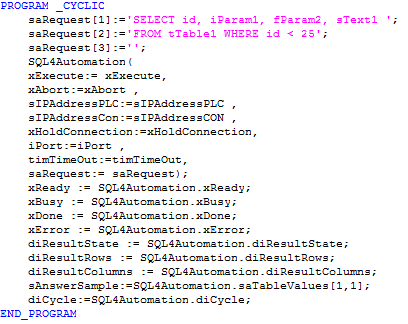
The SQL4BR library file must be copied into the Automation Studio Library directory (default: C:\Programme\BrAutomation\AS\Library). After adding it to the project, configure the SQL request in the saRequest string array, set the IP addresses for both the PLC and the Connector, the port number, and call the SQL4BR function block cyclically. Results are returned in saTableValues (rows x columns).
SQL4automation Link Settings
The SQL4automation Connector is operated with the target setting "Standard" for B&R Automation Studio controllers. The configuration is completed in just a few clicks. Detailed integration instructions are available in the download section.

FAQ's
Frequently Asked Questions to B&R
Which B&R Automation Studio and Automation Runtime versions are required?
B&R Automation Studio V3.0.80.25 or higher and Automation Runtime V3.00 or higher are required. The SQL4BR library must be placed in the Automation Studio Library directory (C:\Programme\BrAutomation\AS\Library). The dependent libraries AsTCP, asstring, and standard are automatically integrated when SQL4BR is added to the project.
How are the IP addresses configured in SQL4BR?
SQL4BR requires two IP addresses: sIPAddressPLC (the IP address of the B&R PLC) and sIPAddressCon (the IP address of the SQL4automation Connector). Both are configured as input variables when calling the SQL4BR function block. The default port is 11001.
How are SQL query results returned to the B&R program?
Results are returned in the saTableValues array (rows x columns as strings) and column names in saColumnsName. diResultRows and diResultColumns report the dimensions. diResultState contains the status code (0 = success). The saRequest string array holds the SQL query and must be populated before setting xExecute.
Can SQL4BR be tested on the B&R Soft PLC?
Yes. The SQL4BR sample project (SQL4BRSample) can be tested on the Soft PLC AR000 included in B&R Automation Studio. The SQL4automation Connector must be running and connected to the sample database S4A_Test_DB.mdb. Setting xExecute to TRUE triggers the test query; xAbort resets on error.
Which SQL databases can a B&R PLC connect to via SQL4automation?
All ODBC-compatible databases are supported, including Microsoft SQL Server, MySQL, MariaDB, PostgreSQL, Oracle, and SQLite. The database is configured in the SQL4automation Connector. No changes to the B&R Automation Studio project are required when switching databases.
Which B&R controllers has SQL4automation been tested on?
SQL4automation has been tested on the B&R Soft PLC AR000 included in B&R Automation Studio (using the SQL4BRSample project). B&R hardware PLCs running Automation Runtime V3.00 or higher are also supported. The library requires B&R Automation Studio V3.0.80.25 or newer. The dependent libraries AsTCP, asstring, and standard are automatically integrated.
Technical Data
Switch to SQL4automation Now.
Connect industrial controllers directly with SQL databases. Field-proven since 2007 for maximum performance and security, completely without middleware.