FANUC
For FANUC robot controllers, SQL4automation provides the SQL4FANUC library implemented in KAREL. SQL4FANUC requires the KAREL (R632) and User Socket Msg (R648) software options on the FANUC controller. Results are returned in the KAREL DataTable array and accessed via type conversion helper functions.
Connecting FANUC Robots to SQL Databases, MES, ERP
SQL4FANUC connects FANUC robot controllers to SQL databases via TCP/IP socket communication using the FANUC User Socket Msg interface. The library consists of two KAREL modules: SQL4Fanuc.kl (the sample entry point) and S4ARoutine.kl (the connection library with helper functions). The SQL query is assembled in the KAREL request string array and sent via the SqlRequest() function.
Integration of the FANUC Library
The client interface is configured via Menu > Setup > Host Comm > Clients. The server IP, port, protocol (SM), and startup state are configured per client tag. After building SQL4Fanuc.kl, database queries are called from TP programs via CALL KAREL with a selector parameter that determines which SQL query to execute. Debug output is available on the FANUC user page.

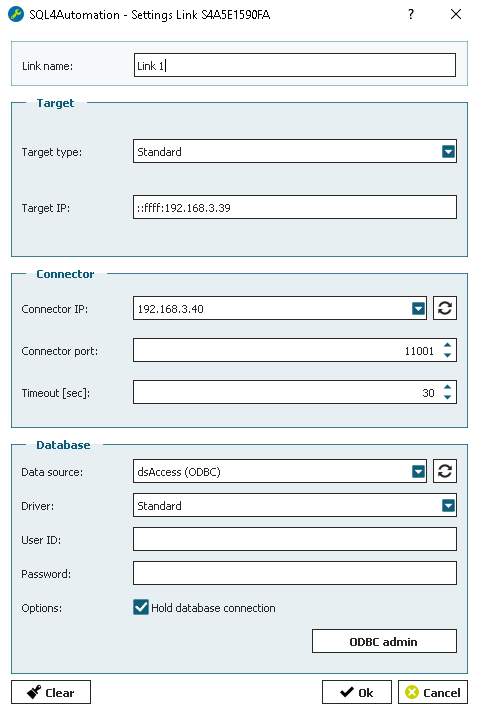
SQL4automation Link Settings
The SQL4automation Connector is operated with the target setting "Standard" for FANUC controllers. The IP address and port of the Connector are configured in the FANUC client interface settings.
FAQ’s
Frequently Asked Questions to FANUC
Which FANUC software options are required for SQL4automation?
Two software options must be enabled on the FANUC controller: R632 KAREL (for running KAREL programs) and R648 User Socket Msg (for TCP socket communication). Both must be ordered from FANUC. Without these options, SQL4FANUC cannot establish the TCP connection to the SQL4automation Connector.
How is the FANUC client interface configured for SQL4automation?
The client is configured via Menu > Setup > Host Comm > [F4] Show > Clients. Find a free client slot, press [F3] Detail, set Comment (client name), Protocol = SM, Startup State = Define, then enter the Connector IP. Navigate to Menu > Next > System > Variables > $HOSTC_CFG to find the client tag entry and set $SERVER_PORT to the Connector port number.
How is an SQL query called from a FANUC TP program?
From the TP program, insert a CALL instruction (INST > CALL > CALL program > KAREL) and select SQL4Fanuc. Pass a selector parameter as a constant integer. In the KAREL program, this selector value determines which SQL query to execute. Debug output is displayed on the user page when Debug = TRUE.
How are query results accessed in the KAREL program?
At Return 0 (success), results are stored in DataTable[Row][Column] as string values. S4ARoutine provides type conversion helper functions: Bool2String, String2Bool, Int2String, String2Int, Real2String, String2Real, GetTpParInt, GetTpParReal, and more. Row and column indices are 1-based in KAREL.
Which SQL databases can a FANUC robot controller connect to via SQL4automation?
All ODBC-compatible databases are supported, including Microsoft SQL Server, MySQL, MariaDB, PostgreSQL, Oracle, and SQLite. The database is configured in the SQL4automation Connector. No changes to the KAREL program are required when switching databases.
Which FANUC robot controllers has SQL4automation been tested on?
SQL4automation has been tested on FANUC robot controllers with software options R632 KAREL and R648 User Socket Msg enabled. These two options are mandatory for the TCP socket communication used by SQL4FANUC. The library is implemented in KAREL and called from TP programs. Testing was performed with the SQL4Fanuc.kl and S4ARoutine.kl modules.
Technical Data
Switch to SQL4automation Now.
Connect industrial controllers directly with SQL databases. Field-proven since 2007 for maximum performance and security, completely without middleware.