HORST
For HORST robot systems, SQL4automation provides the SQL4HORST library supporting both graphical and textual programming modes. Database queries can be integrated into HORST programs as individual functions. Results are returned in a DataTable array accessible as DataTable[Row][Column].
Connecting HORST Robots to SQL Databases, MES, ERP
SQL4HORST enables HORST robots to read motion data, parameters, and sequence information directly from SQL databases. A typical use case is loading path point coordinates, motion parameters, and execution sequences from database tables, allowing robot programs to be updated from a central database without reprogramming. The SQL4HORST_MoveExample demonstrates a complete motion-from-database workflow.
Integration of the SQL4HORST Library
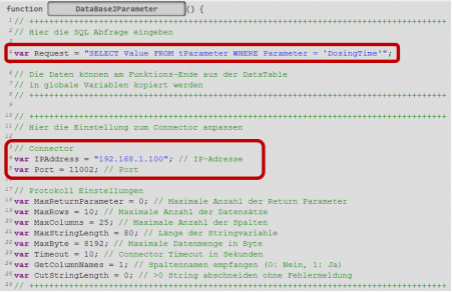
The SQL4HORST library receives parameters such as the IP address and port of the Connector as well as the SQL string. The return values of the SQL query are written to the DataTable table.
For graphical programming, create a separate textual function for each query. Copy the code snippet from the sample project, define the IP address and port variables, and call the function from the graphical program flow. For textual programming, paste the SQL4HORST function at the end of the program and insert the database call at the desired position. Results are in DataTable[Row][Column]; data remains available until the next query.
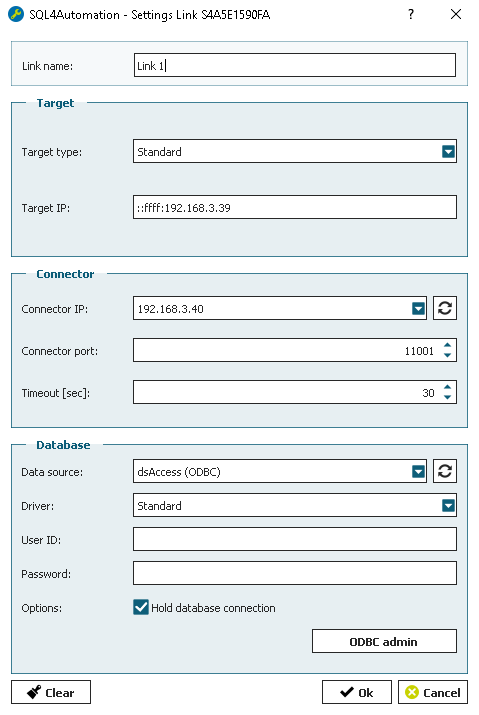
SQL4automation Link Settings
The SQL4automation Connector is operated with the target setting "Standard" for HORST robot systems. The IP address and port of the Connector are passed as variables (IPAddress and Port) in the SQL4HORST function call.
FAQ’s
Frequently Asked Questions to HORST
What is the SQL4HORST_MoveExample and what does it demonstrate?
The SQL4HORST_MoveExample demonstrates reading robot path data from a MariaDB database. Path points (X/Y/Z coordinates, Euler angles, movement type) are stored in the tPositions table. Motion sequences are in tSequences. Job control is in tJobs. The robot reads the path from the database, executes the motion, and writes start/end timestamps back to tJobs -- a complete data-driven motion workflow.
How is SQL4HORST integrated in graphical programming mode?
Create a separate textual function for each database query. Inside the function, copy the SQL4HORST code snippet from the sample project, define IPAddress and Port variables, and insert the SQL request. Then add the function as a Funktions-Aufruf action in the graphical program flow at the desired position. Results are available in DataTable immediately after the function returns.
How are integer or real values included in a SQL query in HORST?
HORST variables must be converted to STRING before they can be included in the SQL command string. Use HORST conversion functions for type conversion. For example, a motor speed value stored as a REAL must be converted to STRING before being concatenated into the SQL INSERT or UPDATE command.
How is the DataTable result accessed after a SQL query in HORST?
Results are available in DataTable[Row][Column]. The first index (Row) is the record number (0-based) and the second index (Column) is the field number (0-based). Example: DataTable[0][2] is the value from the first record in the third column. Data remains stored in DataTable until a new query is executed.
Which SQL databases can a HORST robot connect to via SQL4automation?
All ODBC-compatible databases are supported, including Microsoft SQL Server, MySQL, MariaDB, PostgreSQL, Oracle, and SQLite. The HORST example uses MariaDB, but the database selection is made in the SQL4automation Connector and does not affect the HORST program.
Which HORST robot systems has SQL4automation been tested on?
SQL4automation has been tested on HORST robot systems supporting both graphical and textual programming modes. The SQL4HORST_MoveExample sample project was developed and verified using a MariaDB database, demonstrating a full motion-from-database workflow with the tPositions, tSequences, and tJobs tables. Both graphical (Funktions-Aufruf) and textual integration patterns were confirmed.
Technical Data
Switch to SQL4automation Now.
Connect industrial controllers directly with SQL databases. Field-proven since 2007 for maximum performance and security, completely without middleware.