Mitsubishi Electric GX Works3
For Mitsubishi GX Works3 controllers, SQL4automation provides a sample project and a library. The library can either be opened directly as a new project or integrated into an existing project.
Connecting Mitsubishi PLC to SQL Databases, MES, ERP
For Mitsubishi GX Works3 controllers, SQL4automation provides a sample project and a library. The library can be opened directly as a new project or integrated into an existing project. No additional middleware, no OPC UA gateway, and no changes to the Mitsubishi hardware are required. Communication is handled via standard Ethernet TCP/IP. More information is available in video tutorial T010.
Integration of the SQL4GXWorks3 Library
The SQL4GXWorks3 library receives parameters such as the IP address and port of the Connector as well as the SQL string. The return values of the SQL query are written to the stResult structure, giving your Mitsubishi program direct access to database records without any additional parsing layer.

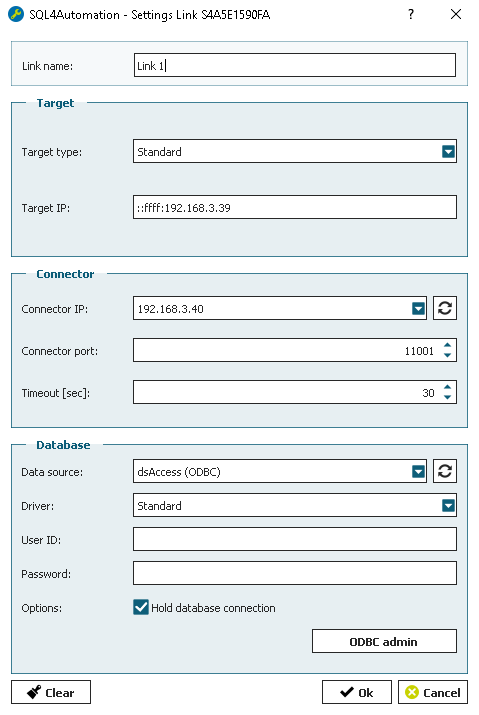
SQL4automation Link Settings
The SQL4automation Connector is operated with the target setting "Standard" for Mitsubishi GX Works3 controllers. The configuration is completed in just a few clicks. Detailed integration instructions and the library download are available in the download section.
FAQ's
Freuqently Asked Questions to Mitsubishi
Can SQL4automation connect a Mitsubishi MELSEC PLC directly to a SQL database?
Yes. SQL4automation provides a dedicated library for Mitsubishi controllers programmed with GX Works3. The library establishes a direct TCP/IP connection between the Mitsubishi PLC and the SQL4automation Connector. No OPC UA server, no database driver on the PLC, and no middleware PC is required beyond the machine running the Connector.
Which Mitsubishi GX Works3 controllers are compatible with SQL4automation?
SQL4automation has been developed and fully tested for the MELSEC iQ-R series (RCPU), including the R04CPU. The MELSEC iQ-F series (FX5CPU), including the FX5U-32M, is supported but has not yet been fully tested due to limited hardware access. Contact us to verify compatibility with your specific FX5CPU model.
How do I integrate the SQL4GXWorks3 library into an existing GX Works3 project?
Register the library to the User Library List in GX Works3. Once added, the SQL4GXWorks3 function blocks appear in the Element Selection window and can be dragged directly into your project. Configure the Connector IP address, port, and SQL string in the function block instance, then call it cyclically in your program.
Does SQL4automation support the Mitsubishi MELSEC iQ-R series?
Yes. The Mitsubishi Electric R04CPU (MELSEC iQ-R series) has been fully tested and verified with SQL4automation. The iQ-R series is programmed with GX Works3 and uses standard Ethernet communication, making it fully compatible with the SQL4GXWorks3 library.
What data does the SQL4GXWorks3 library return from a SQL query?
The library returns results in the stResult structure. iResultState indicates success (0) or an error code. iResultRows and iResultColumns report the dimensions of the result set. For SELECT queries, the full data table is available. For INSERT, UPDATE, and DELETE operations, execution status and error codes are returned. The SQL string is built in the Mitsubishi program, giving full control over query logic.
For which Mitsubishi PLC controllers has SQL4GXWorks3 library been tested?
Mitsubishi Electric R04CPU, FX5U-32M, FX5UJ-24MR/DS
Technical Data
Switch to SQL4automation Now.
Connect industrial controllers directly with SQL databases. Field-proven since 2007 for maximum performance and security, completely without middleware.